
Shadow IT used to mean the occasional tool IT didn’t know about. Now it can mean dozens of apps, accounts, and subscriptions scattered across teams with nobody keeping a complete inventory.
Gartner expects that by 2027, 75% of employees will acquire, modify, or create technology outside IT’s visibility, up from 41% in 2022.
Most of that activity won’t cause a crisis. The problem is the part that does: sensitive data shared with the wrong vendor, software bought without a compliance check, or three departments paying for the same tool.
Below, we walk you through the eight biggest risks, what they look like in practice, and what it can cost you.
What is shadow IT?
Shadow IT is any software, cloud service, or device that employees use for work without the IT department knowing about it or approving it.
Today, that mostly means SaaS: a project management tool bought on a company card, a free file-sharing account, a browser extension, or an AI assistant.
It’s usually not malicious.
“Shadow IT is “rarely the result of malicious intent” and is normally down to staff “struggling to use sanctioned tools or processes to complete a specific task.”
Type of shadow IT | Everyday example |
|---|---|
SaaS subscriptions | A marketing team buys a design tool on a company card |
Free cloud accounts | Someone shares client files through a personal Dropbox |
Messaging apps | A sales team closes deals over WhatsApp |
Browser extensions | An AI writing plugin reads everything typed into the browser |
AI tools | An analyst pastes a customer list into a free chatbot |
Personal devices | A contractor works on their own unmanaged laptop |
Note that shadow IT isn’t the same as bring your own device policy. With BYOD, the company knows about the device and controls how company data sits on it. With shadow IT, nobody does.
Why do employees use shadow IT?
Most employees aren't deliberately trying to bypass IT policies. They're trying to get work done, but inadequate tools, complicated procurement procedures, and lengthy approval processes often make it easier to find their own solutions than wait for an authorized one.
Take a marketing team preparing a campaign with a tight deadline for example. Its approved design software lacks a feature the team needs, while an alternative offers a free trial that takes minutes to activate. Rather than waiting for procurement approval, someone signs up and starts working.
That decision may solve an immediate problem, but the new application could now contain company files, customer information, and payment details without IT knowing it exists.
Slow approvals, missing features, and easily accessible AI tools make this common. In fact:
“Technology spending managed outside IT averages up to 36% of the formal IT budget.”
The UK's National Cyber Security Centre points out that shadow IT often arises because employees struggle with approved systems.
“If you blame or punish staff, their peers will be reluctant to tell you about their own unsanctioned practices, and you'll have even less visibility of the potential risks.”
Rather than simply banning unauthorized tools, companies need to understand what employees are trying to accomplish and make procurement easier.
Najar simplifies the process by centralizing purchase requests and automatically routing them to the right approvers, helping employees get the tools they need without leaving IT in the dark.
The 8 biggest shadow IT risks
Shadow IT creates problems in three areas:
- Security
- Spending
- Day-to-day operations
An unapproved application could expose customer information or create a compliance gap. It could also mean paying for software your company already owns, missing a cancellation deadline, or relying on a tool nobody knows how to maintain.
Some risks are obvious, while others remain unnoticed for months.
1. Data leaks and security breaches
Every tool your IT team doesn't know about is a tool it can't protect. Nobody checks whether it uses strong authentication, how it stores your data, or whether it gets security updates.
If one of those tools is breached, you may not find out until your data turns up somewhere it shouldn't.
A real example came in 2023, when Samsung employees uploaded sensitive company source code to ChatGPT.
Samsung subsequently restricted employees' use of generative AI tools over concerns about confidential information being stored on external servers. The AI platform itself wasn't hacked; employees had shared sensitive data without adequate safeguards.
These tools also often sit outside single sign-on (SSO), so employees create separate passwords, often reused ones, and multi-factor authentication is optional at best.
And it can be costly: the global average cost of a data breach is at $4.44 million.
2. Shadow AI
Shadow AI is the fastest-growing kind of shadow IT. Employees paste contracts, customer lists, and financial data into AI tools to work faster, often on free plans whose terms allow the provider to use that data.
IBM found that organisations with high levels of shadow AI paid an average of $670,000 more per breach than those with little or none.
Those breaches also exposed customers' personal data more often: 65% of the time, against 53% for breaches overall.
It's also hard to see:
“20% of retailers had no recorded AI spend at all, even though their teams were clearly using AI every day. The tools were there, but they weren’t on anyone’s books.”
AI features now arrive inside tools you already pay for. A note-taking app or browser extension can start sending your data to an AI model after an update, without anyone buying anything new.
3. Compliance failures
Unknown applications create compliance problems because companies may not know where personal information is stored, who can access it, or whether the supplier meets their regulatory obligations.
For example, an HR employee might upload candidate records to an unapproved recruitment platform. If the vendor processes that data on the company's behalf, GDPR generally requires an appropriate data processing agreement. Without a proper review, the company may not know whether the necessary protections are in place.
For European organizations, several regulations are particularly relevant:
- GDPR requires appropriate safeguards for personal data, with serious infringements potentially leading to substantial fines.
- NIS2 requires covered organizations to manage cybersecurity risks, including relevant supplier and supply-chain risks.
- DORA requires covered financial entities to maintain information about their ICT third-party arrangements.
The requirements differ depending on the business and service, but the underlying problem is the same: a company cannot properly assess a supplier it doesn't know it's using.
For security teams, the main security frameworks all start with knowing what you run. CIS Critical Security Controls 1 and 2 cover inventories of hardware and software, and NIST SP 800-53 control CM-8 requires a component inventory. Shadow IT is, by definition, what's missing from them.
4. Access that outlives the employee
When someone leaves, IT removes their access to every tool it knows about. Shadow IT tools aren't on that list. So a former employee can keep logging into a project board, a shared drive, or a customer database for months, with company data still inside.
The same gap costs money too: licences for people who've left keep renewing, because nobody knows they exist.
Don’t forget to check who owns the account, not just who uses it. If the only admin of a tool leaves, you may lose access to your own data.
5. Duplicate software spending
When departments purchase software independently, they may end up paying for tools that perform similar functions.
Imagine a company where marketing, sales, and product each subscribe to a different collaboration platform, costing €400 per month per department.
That's €14,400 annually across three subscriptions, even though some teams might be able to use tools the company already provides. Consolidating those subscriptions could reduce unnecessary spending and give procurement more leverage when negotiating with vendors.
However, the decision should consider actual usage and features rather than assuming every overlapping application is redundant.
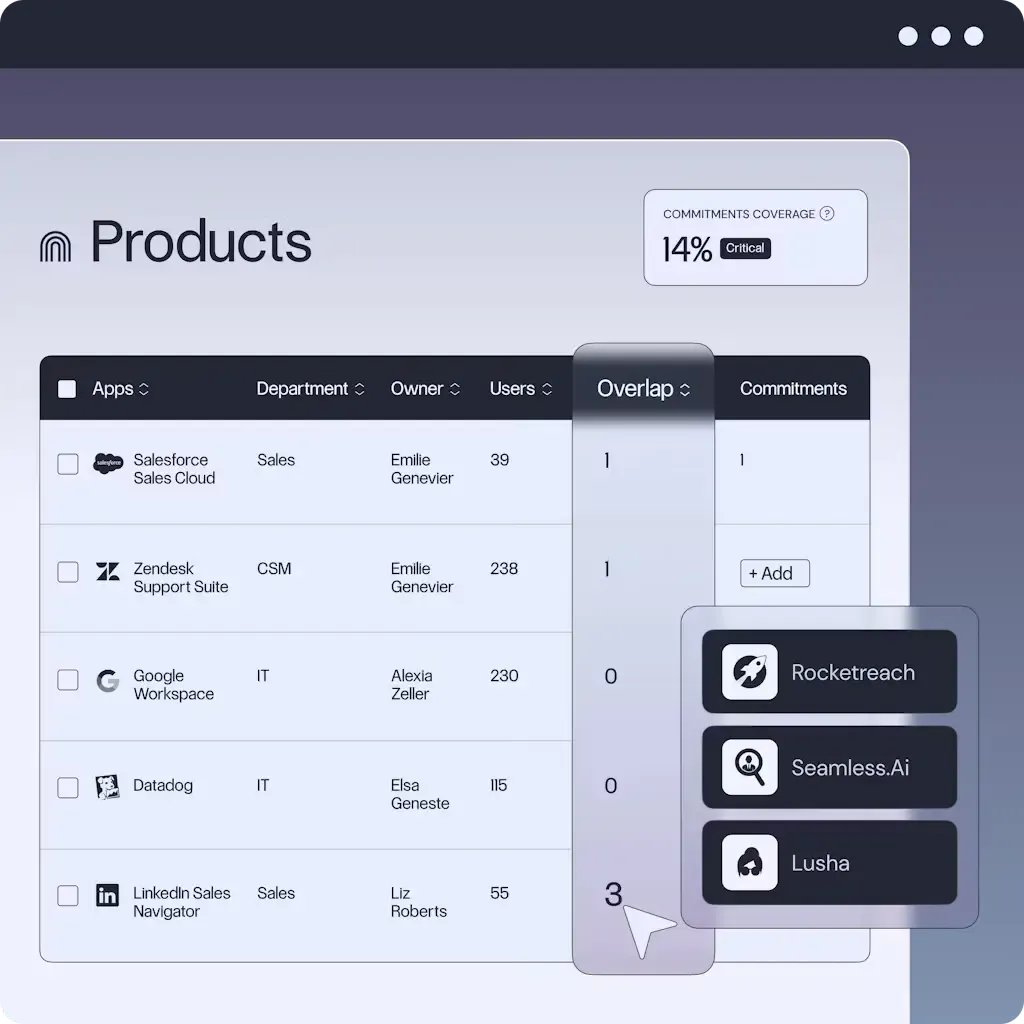
Najar helps identify these opportunities by examining software spending, contracts, and usage across departments. That makes it easier to spot overlapping subscriptions and decide which tools are worth retaining.
Want to see where your money goes? Read our guide to SaaS spend visibility.
6. Paying list price
Software bought on a card skips procurement entirely. Nobody compares prices, checks benchmarks, or negotiates, so the company pays whatever the pricing page says.
Small details quickly add up:
“Paying monthly instead of annually alone can create “a 15% to 20% gap in pricing” before anyone starts negotiating.”
Once a tool becomes essential, you lose your leverage. The vendor knows the team relies on it, and the renewal price reflects that.
To check whether you’re paying a fair price, check our guide to SaaS pricing benchmarks.
7. Contracts nobody reviewed
Clicking "I agree" is signing a contract. Shadow IT tools come with terms nobody in legal or procurement has read, and those terms can include:
- Auto-renewal clauses that lock you in for another year if you miss a notice window
- Price increase clauses that let the vendor raise prices at renewal
- Data ownership and export terms that make it hard to get your data back
- Liability limits that leave you exposed if the vendor is breached
Because nobody tracks the renewal dates either, these contracts renew silently, often at a higher price. In addition, many SaaS contracts require notice 30 to 90 days before renewal. If you miss that window, you’ll be paying for another year, whether you still need the tool or not.
Reviewing these terms before renewal also gives procurement an opportunity to negotiate stronger SaaS contract protections, including price caps, more flexible licensing, and clearer cancellation conditions.
8. Data silos and fragile workflows
Shadow IT tools rarely connect to the rest of your systems. Customer data ends up split across tools that don't talk to each other, and reports stop matching.
Worse, whole processes can come to depend on a tool one person set up. When that person leaves or the free plan changes, the process breaks, and IT can't fix what it never knew was there.
How to reduce shadow IT risks
The first step is figuring out which applications employees are already using.
- Start by comparing identity-provider records with company spending.
Login activity from Google Workspace, Microsoft, or your SSO provider can reveal applications employees access, while invoices, expense reports, and company-card transactions show subscriptions that may have bypassed procurement.
Neither source provides a complete picture on its own. Once you’ve identified these tools,
- Use a SaaS spend management platform to centralise visibility.
A SaaS spend management platform brings software purchasing, spending, contracts, and renewals into one place.
It makes it easier to identify unapproved applications, duplicate subscriptions, and tools operating outside procurement oversight by consolidating information from different sources.
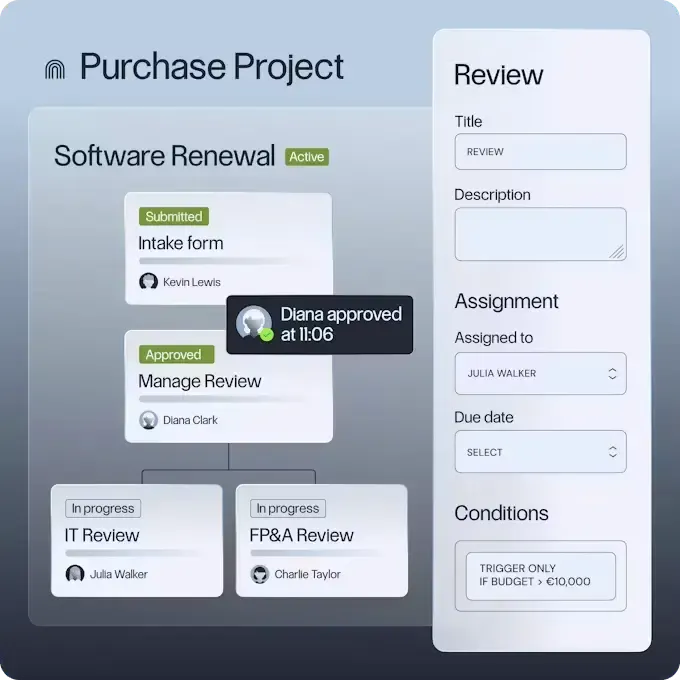
Platforms like Najar also help IT and finance teams track software usage and manage purchasing requests through structured approval workflows. This gives employees a clear way to request new tools while keeping procurement informed.
- Review them based on their purpose, security, and business value.
An application that solves a genuine problem may be worth approving and bringing under centralized management. Others might duplicate existing software or present unacceptable data risks.
- Make it easier for employees to request new tools.
If approvals consistently take weeks, people will continue finding workarounds.
Clear purchasing procedures, straightforward security requirements, and practical AI usage policies help reduce that incentive.
- Bring approved applications into your inventory, review access permissions, and track their renewal dates.
This gives IT and procurement more control over security and costs without unnecessarily restricting the tools employees need.
For a more detailed walkthrough, see our guide to shadow IT management.
How Najar helps you control shadow IT
Najar gives you a live view of every piece of software your company uses, including the tools nobody told IT about.
It connects to Google Workspace, Microsoft, Okta, and OneLogin to see which tools people actually log into and to accounting tools like Pennylane, DATEV, Sage, and NetSuite to see what you're paying for. That shows you duplicate tools, unused licences, and upcoming renewals in one place.
Then Najar’s IT buyers step in. Backed by €6B in analysed European spend data, they help you consolidate, renegotiate, or cancel, so bringing shadow IT under control also lowers your software bill.
If shadow IT is costing you more than you’d like, we’d love to show you how Najar works.
Review your software stack with our buyers and see where the savings are
Frequently Asked Questions (FAQs)
What are some examples of shadow IT?
Common examples include SaaS tools bought on a company card, personal cloud storage accounts used for work files, messaging apps like WhatsApp used with clients, browser extensions, and AI chatbots used with company data.
Why is shadow IT considered a compliance risk?
Because you can't protect data you don't know about. Shadow IT tools often process personal data without a data processing agreement, which can breach GDPR.
For companies covered by NIS2 or DORA, unknown software suppliers also create gaps in the required supply chain and ICT supplier records.
What is shadow AI?
Shadow AI is the use of AI tools, like chatbots, writing assistants, or AI browser extensions, without the IT department's approval.
It's riskier than most shadow IT because employees often paste sensitive data straight into these tools.
How do companies find shadow IT?
The most reliable way combines two sources: identity data, such as SSO and Google Workspace or Microsoft logins, which shows what people use, and finance data, such as card statements and invoices, which shows what you pay for.
SaaS management platforms bring both together automatically. Read more about SaaS management platforms.
Can SaaS management tools reduce shadow IT risks?
Yes. They can't stop someone signing up for a tool, but they make it visible quickly, so you can decide whether to approve it, replace it, or cancel it before it becomes a security, compliance, or cost problem.
How we researched this
We read guidance from the UK's National Cyber Security Centre, IBM's latest Cost of a Data Breach report, Gartner research, and the EU regulations that apply to software buying. We also drew on what Najar's IT buyers see every week when they review companies' software stacks and on Najar's own 2026 retail benchmark. Everything is up to date as of November 2026.