
When companies expand, they have to manage more laptops, licences, cloud subscriptions, and vendors.
If there is no clear system, IT teams can lose track of what they own, who is using it, and how much it costs.
An IT asset management software like Najar helps by giving teams one place to track, manage, and optimise every asset from purchase to retirement.
But how do you pick the right tool for your company?
What's an IT asset management software
IT asset management software helps organisations keep track of their technology, like laptops, servers, software licences, and cloud subscriptions, so they can manage these assets better and get more value from them.
Rather than using spreadsheets or scattered records, this software gives IT, finance, and procurement teams a single place to see what assets they have, where they are, how they are used, and what they cost over time.
A spreadsheet can keep a list, but it cannot show when a licence is not being used, remind you about renewals in advance, or link an asset to the employee who uses it.
IT asset management software is designed to fill these gaps.
Why is IT asset management software important
The shift to SaaS has changed what "IT assets" even means. A few years ago, asset management was mostly about laptops and servers.
Now it's dozens or hundreds of software subscriptions, often bought by different teams without going through IT at all.
That shift brings three consequences that IT asset management software is built to address wasted spend on assets nobody's using, compliance risk when usage doesn't match what's licensed, and security exposure from tools IT never approved.
4 types of IT assets
An IT inventory typically includes four main categories of assets. Together, they represent everything an organisation owns, licenses, or manages to support its technology operations.
Asset Type | Examples | What You Track |
|---|---|---|
Hardware Assets | • Laptops | • owner |
Software Assets | • Operating systems | • license usage |
Cloud Assets | • Cloud storage | • resource usage |
Data Assets | • Contracts | • documentation |
1. Hardware Assets
Hardware assets are the physical devices that make up your IT infrastructure, including laptops, desktops, servers, mobile devices, networking equipment, printers, and security cameras.
Managing hardware means tracking ownership, location, maintenance, warranties, and lifecycle status. This helps extend asset life, reduce replacement costs, and ensure equipment is available when employees need it.
2. Software Assets
Software assets include operating systems, applications, SaaS subscriptions, and software licences.
Effective software asset management involves tracking installations, licence usage, renewal dates, versions, and compliance. This helps eliminate unused licences, avoid under- or over-licensing, and prepare for vendor audits.
3. Cloud Assets
Cloud assets are virtual resources hosted by cloud providers, such as cloud storage, virtual machines, databases, networking services, identity and access management (IAM), and security tools.
Cloud resources can be created or scaled whenever you need them, which makes them easy to forget about. Keeping track of these resources helps control costs, maintain security, and avoid letting unused resources pile up.
4. Data Assets
Data assets include the information that supports your IT operations, such as contracts, warranties, user records, asset locations, and business applications.
Although they aren't physical or installed like hardware and software, these records provide the context needed to manage assets throughout their lifecycle.
Keeping them up to date improves reporting, supports compliance, and gives teams a complete view of their IT environment.
What are the risks of not using IT asset management software
Without a centralised system, IT asset issues often surface at the worst possible time, such as during an audit, contract renewal, or budget review.
One of the biggest risks is overspending. Licences remain assigned to former employees, different teams purchase duplicate software, and subscriptions renew automatically because no one realises they are still active.
There are also compliance risks. Software vendors regularly compare actual usage against licensing agreements.
Exceeding your licensed seat count or using the wrong licence type can result in unexpected costs or penalties, while poor record-keeping can turn even a routine audit into a time-consuming exercise.
Finally, organisations face security risks from shadow IT.
Software purchased outside approved procurement processes often bypasses security reviews, leaving IT teams unaware of applications that may contain weak passwords, outdated software, or sensitive company data.
Important features to look for in IT asset management software
Not all asset management tools solve the same problem. Here's what separates a platform that actually reduces waste from one that just digitises your spreadsheet.
Centralised asset repository
A single source of truth for every asset, department, and employee, instead of records split across tools and inboxes.
Automated discovery and tracking
New tools and devices get flagged automatically as they join your environment, so your inventory doesn't go stale the moment someone signs up for a new SaaS tool.
Licence and compliance monitoring
Real-time tracking of licence counts against actual usage, with alerts before you're over-provisioned or under-licensed.
Usage-based reporting
The difference between an asset being assigned and an asset being used. Reports should show both, so you can catch waste that assignment records alone would miss.
Workflow automation
Onboarding and offboarding should trigger asset assignment and revocation automatically, not depend on someone remembering to update a list.
Integration with procurement and spend workflows
Asset management works best when it's connected to how software actually gets bought. That means visibility into requests, approvals, and contracts, not just what's already been purchased.
Najar keeps your IT assets under control
⭐️ Ratings: G2 4.6/5 (36) · Capterra 4.9/5 (22) · FeaturedCustomers 4.8/5 (426)
Pricing: Contact Najar for a demo and personalised quote.
IT asset management software handles everything from physical devices to cloud infrastructure and software licences.
However, if you mainly need to manage software and SaaS, track subscriptions, control licence spending, and keep vendor contracts organised, Najar is designed for you.
Najar helps mid-sized and large enterprises manage a wide and often scattered set of software assets.
Najar helps mid-sized and large enterprises manage a wide and often scattered set of software assets.
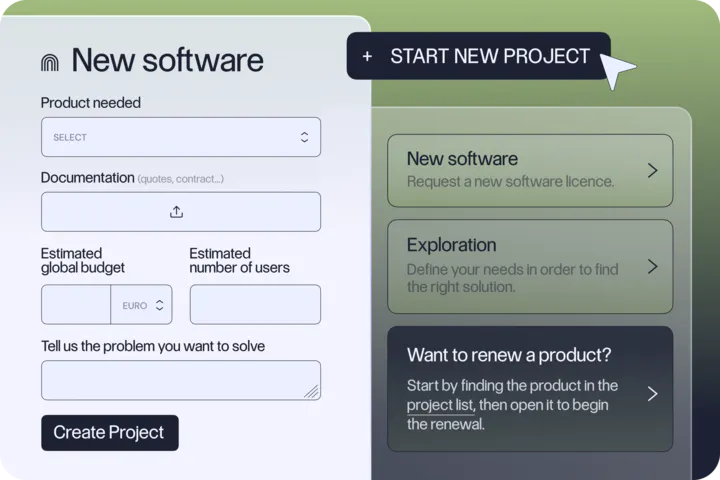
It gives you the same visibility and control as an in-house procurement team, without the need to hire one.
Najar brings spend tracking, workflow automation, contract management, and expert negotiation support together in one platform. It stands out by combining advanced technology with real human expertise.
Finance and procurement teams can easily view all software subscriptions, renewal dates, and vendor contracts, with help from IT procurement specialists who negotiate better prices and terms. If you need better visibility into your software and SaaS assets, here's what Najar offers:
- Complete SaaS discovery and inventory: Centralises all SaaS tools, licences, and ownership across the organisation.
- Usage and spend tracking: Tracks licence usage, spending, and utilisation to help you find waste and spot opportunities to optimise.
- Smart purchase requests: A structured intake system with automated routing, approvals, and workflow setup.
- Collaborative approval and procurement hub: Lets stakeholders review vendors, contracts, and decisions all in one place.
- Expert vendor negotiation: Najar's procurement team finds vendors and negotiates pricing, terms, usage rights, and support for you.
- Contract and renewal management: Centralises contracts, tracks renewals, and helps you avoid unwanted auto-renewals.
- AI-powered insights and automation: Offers recommendations, forecasting, benchmarking, and automates complex procurement tasks.
Najar also specialises in Europe, offering detailed vendor data and strong local support for European customers.
It gives you full visibility into tail spend, those small, unmanaged purchases that can add up in tools, renewals, and blind spots.
Clients have reported saving up to 36% on individual contracts, and some have saved even more, over 45%.
See how Najar can help you manage your IT assets.